
Connect your ORCID iD
ORCID gives researchers a unique identifier that stays with them throughout their career. It separates your work from that of researchers with similar names, so your publications are attributed to you consistently wherever they appear.
Linking your ORCID iD to your UKF profile lets new outputs added to the repository update your ORCID record, and adds your University of Khorfakkan affiliation to that record.
- 1Open the profile editor.
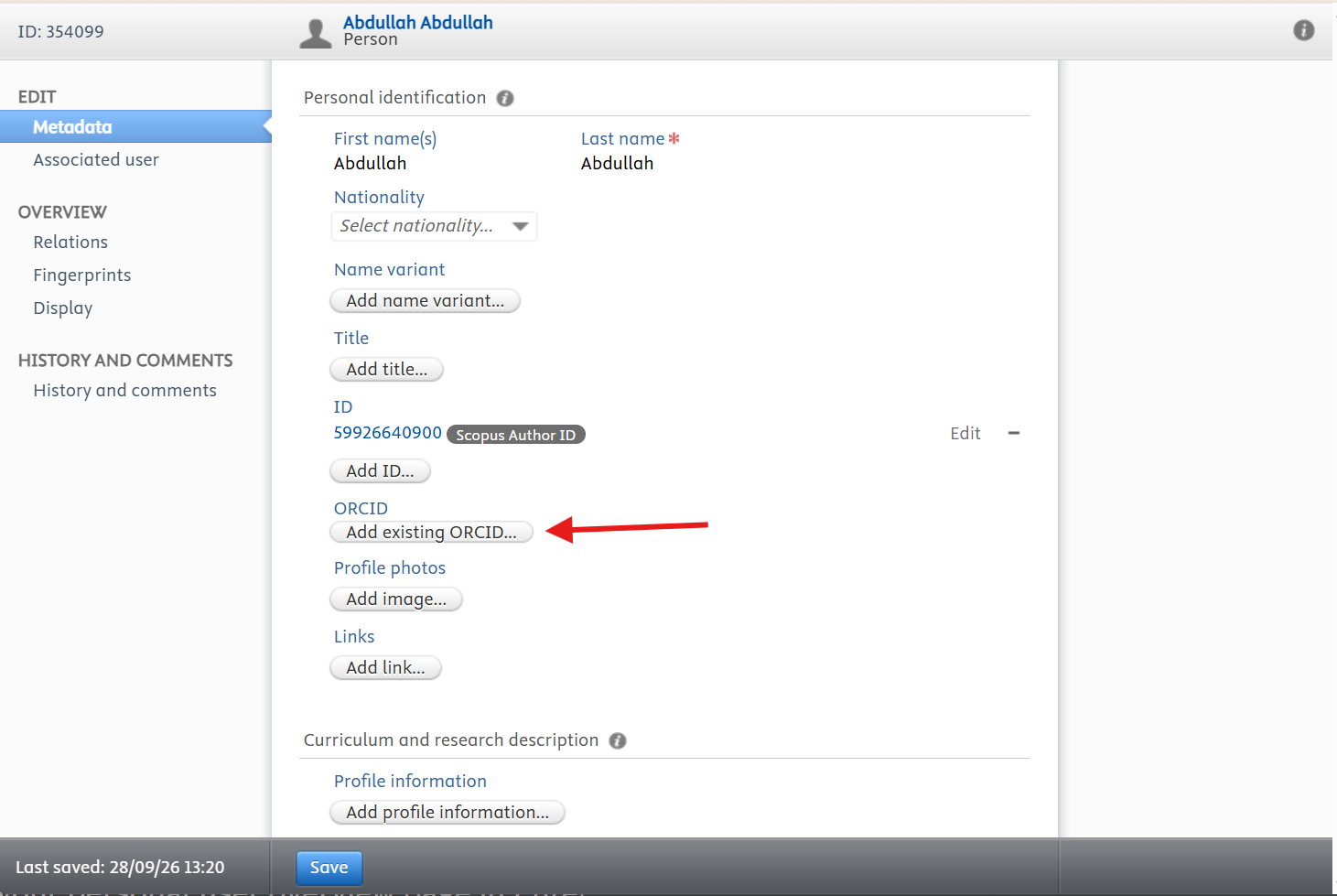
- 2Under Personal identification, find ORCID and click Add existing ORCID…
- 3Follow the instructions on screen to sign in to ORCID and authorise the connection.
- 4Click Save at the bottom of the page. Your iD then appears under your title on your public profile.
If you do not have an ORCID iD yet, register for one at orcid.org, then add it to your profile here.
Connecting your iD does not copy publications from ORCID into the repository. Publications still need to be added to your profile, as described in Adding publications.
Before you leave the editor, click Save at the bottom of the page. Changes are only stored when you save, and anything you entered is lost if you navigate away first.